Before You Click Create: LXC, VM, Docker, or Bare Metal
- Published
- 11 June 2026
- Updated
- 11 June 2026
If you are new to Proxmox, the where-to-put-it question can feel like four tabs in a dashboard arguing with each other: LXC, VM, Docker, and bare metal.
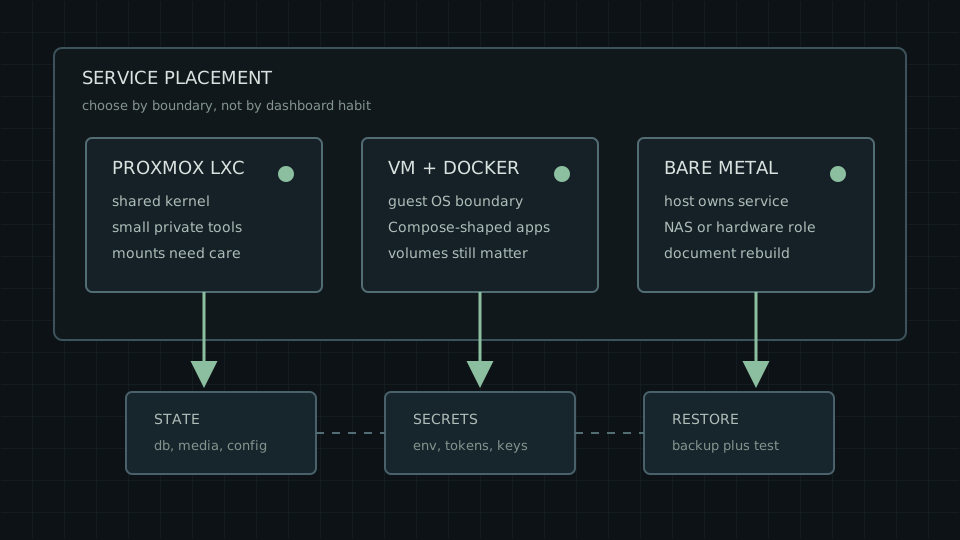
The useful question is simpler: what has to move, break, and come back together?
That is the service boundary. It is the line around the program, its data, its secrets, its network exposure, its backup path, and the thing you will rebuild when it breaks.
That line might be a Proxmox LXC container, a VM, or Docker inside a VM because the application expects a Compose-shaped world. It might also be a plain Linux host with fewer layers and better notes.
So ignore the badge for a minute. Look at state, secrets, exposure, backups, hardware, and rebuild notes. A homelab service belongs in the simplest place whose failure mode and restore path you can explain before the failure arrives.
First, The Plain Words
Use these definitions before touching the Create button.
| Term | Plain meaning |
|---|---|
| Proxmox host | The physical machine running Proxmox VE. It owns the virtualization layer, storage definitions, networking, and guest management. |
| LXC container | A lightweight Linux system container managed by Proxmox. It has its own userland, but it shares the host kernel. |
| VM | A virtual machine with its own guest operating system running on virtual hardware through QEMU/KVM. |
| Docker inside a VM | A Linux VM that exists mostly to run Docker or Compose applications inside it. |
| Bare metal | A Linux host running the service directly, without Proxmox wrapping that service as a VM or container. |
| State | The data that must survive: databases, uploads, media, config directories, generated files, and app-specific storage. |
| Restore path | The actual sequence that brings the service back, not just the backup file you hope will help. |
The dashboard asks where to create the thing. Your future self needs to know what owns the data, which backup includes it, where secrets live, and what gets exposed.
The Quick Version
If you want the short answer first, start here.
| Service shape | Good first answer | Why |
|---|---|---|
| Small private Linux helper | Proxmox LXC | It avoids a full guest OS when the service has little state and stays private. |
| App whose docs expect Docker Compose | Docker-in-VM | The app keeps its expected Docker shape, while Proxmox still gives you a VM boundary. |
| Public-facing web app | Proxmox VM or Docker-in-VM | Public exposure raises the cost of weak isolation, unclear secrets, and casual updates. |
| Service that owns disks, tuners, USB, GPU, or odd hardware | Bare metal, or a VM with carefully tested passthrough | Hardware access can make a neat container answer wrong. |
| Storage receiver or service on a storage host | Bare metal can be sensible | Sometimes the host should own the storage role directly. Document it properly. |
| Disposable experiment | LXC or isolated VM | Deletion should leave no state scattered across the host. |
Valuable data, public access, and strange hardware all deserve a more careful home than the default.
Six Questions Before You Click
Before you create anything, write down the answers to these.
| Question | What it is really asking |
|---|---|
| What state would hurt to lose? | The database, media directory, config directory, uploads, generated files, or nothing much. |
| Where do secrets live? | Env files, tokens, app passwords, API keys, TLS material, encrypted files, or a separate secrets system. |
| What backup actually restores the service? | A Proxmox backup, an app export, Docker volume backup, bind-mounted file backup, database dump, or some combination. |
| Is it local-only, public, or halfway exposed? | Local-only helpers have a different job from browser-facing apps, tunnel-reached admin panels, or anything advertised through public DNS. |
| Does it need hardware or kernel behaviour? | USB devices, GPUs, tuners, filesystems, kernel modules, and odd device access can overturn tidy architecture. |
| Can it be rebuilt without archaeology? | A service is portable when the notes, config, state, and secrets can recreate it. |
Those questions matter more than the logo. A bookmark manager with one data directory, a photo library with a database and original uploads, a monitoring helper, a reverse proxy, a media workload, and a backup receiver all ask different things from the machine underneath.
Proxmox LXC: Shared-Kernel System Containers
Proxmox VE uses LXC containers, which are lighter than full virtual machines because they share the host kernel rather than emulating a full operating system.
An LXC container has its own userland and container isolation features while relying on the host kernel.
An LXC container can be a sensible home for small Linux services, private helpers, monitoring tasks, and simple stateful services where the data path is obvious. It is a Proxmox-managed object and can use Proxmox storage and backup tooling.
LXC uses kernel isolation features such as namespaces, cgroups, AppArmor, and seccomp. In an unprivileged container, root inside the container maps to an unprivileged user on the host; a privileged container gives the container much more trust. Proxmox says privileged containers should only be used in trusted environments. For sensitive data or a public-facing app, a VM or a well-hardened host gives you a clearer boundary.
For LXC, the state path deserves special attention. Proxmox supports storage-backed mount points, bind mounts, and device mounts, but bind mount contents and device mount contents sit outside vzdump backups. If the important data lives outside the container root filesystem, verify that those paths have their own restore plan. The small print is where the restore lives. Naturally.
LXC fits when the service is Linux-native, private or low-risk, has a clear state path, and can share the host kernel. A VM is a better fit for public-facing services, high-value secrets, broad host bind mounts, or workloads where host exposure is hard to explain.
Proxmox VE can also create LXC containers from OCI (Open Container Initiative) images, the same image format used by Docker and Podman. The docs discuss both system containers and OCI “Application Containers,” but the application-container path is still described as a technology preview. OCI images imported into Proxmox still become part of the LXC model, which has a different operating story from a Docker Compose stack. For maximum isolation and live migration when nesting application containers, Proxmox still points readers toward running them inside a QEMU VM.
That means the slogan “Proxmox cannot do OCI images” is out of date. It does not make Proxmox OCI application containers the default answer in this article for stateful, public-facing, multi-container apps.
Proxmox VM: The Clearer Guest Boundary
A Proxmox VM gives the service a guest operating system on QEMU/KVM virtual hardware. The QEMU/KVM documentation describes QEMU as emulating a physical computer, with the guest OS seeing virtualized hardware.
A VM feels like a small separate server. It has its own OS, virtual disks, firewall, runtime, secrets, logs, and backup object. Security still depends on the guest and the application, but the line around the service is easier to see than it is with a shared-kernel container.
That clarity is useful for public-facing services, mixed dependency stacks, services with a separate patching cadence, Compose-first applications, and workloads that need a more distinct OS boundary. It also fits hardware passthrough discussions better than LXC. Proxmox documents PCI(e) passthrough as a way to give a VM control over a host PCI device, with the practical consequence that the passed-through device is no longer available to the host or other VMs. Live migration also becomes constrained when hardware is passed through.
The price is the extra machine to care for. You now maintain the Proxmox host and the guest OS. If the app also runs Docker inside that guest, you maintain the container runtime and images too. That can be worth it; just count it.
Use a VM when the service needs a clearer OS boundary, a different operating system shape, hardware passthrough, a Docker host boundary, or a stronger answer to “what do I move or restore as a unit?” For a tiny private helper, LXC or a bare-metal systemd service may keep the maintenance smaller.
Docker Inside A Proxmox VM: Common Compromise, Extra Layer
Docker inside a Proxmox VM is common because a lot of self-hosted software expects Docker or Compose. It is often the least surprising way to run that software, provided you accept the restore job that comes with the extra layer.
Think of Docker-in-VM as two boundaries. Docker decides how the app runs inside Linux. Proxmox decides what contains that Linux system.
The boundary then has two layers:
- Proxmox owns the VM boundary, VM disks, VM config, and VM-level backup.
- Docker owns the containers, images, volumes, bind mounts, networks, and daemon inside the guest.
The Docker docs describe containers as isolated processes that share the same kernel, while VMs have their own OS and kernel. The Docker security docs also call out namespaces, cgroups, the Docker daemon attack surface, capabilities, and profiles as part of the security picture. In plain terms: Docker is the application runtime; the VM is still the operating-system boundary.
State is the part to get right. Docker volumes are Docker-managed persistent data stores and are generally easier to back up or migrate than bind mounts. Docker bind mounts are tied to the host filesystem and can write to host files by default.
Inside a VM, “the host filesystem” for Docker is the guest filesystem. That helps keep the Docker host inside the VM boundary, but it still leaves an app-level restore job to plan. If Proxmox backs up the whole VM while a database is writing, you may still need app-aware backup, a database dump, a way to pause writes before the snapshot, or a tested restore. VM backup modes trade consistency and downtime; snapshot mode has a small inconsistency risk even though it reduces downtime.
Docker-in-VM fits multi-container apps, Compose-first software, public or tunnel-reached stacks that deserve a guest boundary, and services where the app’s expected runtime model should remain intact. Pair it with volume, database, secret, and image-version notes, because that is where the restore work hides.
Docker Inside LXC Is A Separate Project
Docker-in-LXC is a separate advanced path, so this article leaves commands out.
If you want a Docker or Compose-shaped application stack on Proxmox, the default answer in this article is Docker inside a VM. If you want Proxmox-native LXC, treat it as a system-container boundary and read the Proxmox OCI application-container note above.
Docker-in-LXC can be made to work in some environments. It mixes a container runtime with a shared-kernel system container, so use it only when you can explain the runtime, mount, backup, and recovery model.
Bare-Metal Linux: Fewer Layers, Fewer Wrappers
Bare metal means the service runs directly on a Linux host, without Proxmox wrapping that service as a VM or CT. That host might be ordinary Debian with packaged services and systemd units. It might be a dedicated storage box. It might be a NixOS NAS host running one containerized service.
Bare metal’s appeal is simplicity of stack. There is no Proxmox object to maintain, no guest OS below the app unless the host itself counts, and hardware access is direct. For storage receivers, monitoring agents, local-only daemons, and hardware-bound services, that can be a feature rather than a missing dashboard.
On a mutable Debian host, packages come through APT and dpkg, with the administrator responsible for package choices, service risk, and recovery. systemd service and unit files describe the service-management layer. This is ordinary Linux, and the rebuild notes still have to exist somewhere.
In return, you supply the rebuild discipline. A Proxmox VM at least gives you an obvious object to back up, move, or restore. A bare-metal service needs package notes, config files, state paths, firewall rules, secrets, and hardware assumptions recorded somewhere that will survive your memory.
Bare metal works best when the host really is the service: a storage receiver, a hardware-owning media service, a simple packaged daemon, or a host you intentionally manage as a unit. Put messy experiments, dependency piles, public apps with unclear rollback, and archaeological rebuilds behind a VM or container boundary instead.
One Bare-Metal Pattern: A NixOS NAS Host
The NixOS articles on this site describe one bare-metal pattern: a NixOS host acting as the household NAS, with a declared Podman-backed service and secrets handed to the service at runtime. In this context, NAS-side means the storage host owns the service directly, separate from a Proxmox virtualization host.
That is covered in three pieces:
- Building a Minimal NixOS Homelab Host for the base host and rebuild loop.
- Adding a Homelab Service with NixOS, Podman, and Fewer Rituals for one service with explicit state.
- Managing Homelab Secrets Without Committing Them Like a Menace for encrypted repo secrets and runtime secret files.
In this article, that pattern is one example among several. Proxmox VMs and Docker-in-VM are doing real work in small homelabs too. The NixOS material is useful here because it shows one bare-metal host pattern where state paths, service definitions, and secret handoff are made explicit.
NixOS configuration can declare users, services, firewall rules, systemd units, and OCI containers. Podman is a daemonless OCI container engine that can run containers as root or as a non-privileged user. Separately, Podman’s docs describe Quadlet as a way to manage containers, pods, volumes, networks, and images declaratively through systemd unit files.
The reason to bother is rebuildability. State paths, image names, ports, env files, and service units can be visible in the host definition. Declarative config improves the rebuild story; containers still share a kernel, and NixOS containers themselves are documented as not perfectly isolated from the host. The useful property here is that the state, service, and secret handoff have fewer places to hide.
This kind of pattern earns its keep when reviewable host config and rebuild discipline matter more than dashboard convenience. Mutable Debian or Proxmox may be the shorter familiar path when the service state is poorly understood.
How The Options Differ
This table is here to flush out the first awkward question.
| Boundary | Best fit | Check |
|---|---|---|
| Proxmox LXC | Small Linux services, private helpers, low-risk internal tools, simple state with clear mounts. | Shared host kernel, privileged/unprivileged difference, and bind/device mount backup exclusions. |
| Proxmox VM | Public-facing apps, mixed stacks, separate OS needs, passthrough cases, Docker host VM. | More maintenance layers: Proxmox host, guest OS, app/runtime, backup consistency. |
| Docker-in-VM | Compose-first apps, multi-container stacks, apps whose upstream docs assume Docker. | VM backup and app restore are separate jobs; Docker volumes and bind mounts need their own plan. |
| Bare-metal Linux | Simple packaged services, local daemons, hardware-owning workloads, storage receivers. | Rebuildability depends on documentation, package state, config backups, and secret handling. |
| NixOS NAS-side host | Reviewable host config, explicit state paths, one-service-at-a-time self-hosting. | Declarative config improves rebuilds; VM-style isolation and runtime/version discipline remain separate topics. |
Common Cases
| Service type | Usual fit | Why |
|---|---|---|
| Stateless private helper | Proxmox LXC or bare-metal systemd | Low state burden and low blast radius make a light boundary reasonable. |
| Stateful private app with one clear data path | LXC, Docker-in-VM, or a bare-metal container host | The key question is which state path you can back up and restore cleanly. |
| Multi-container app with Compose-first docs | Docker inside a Proxmox VM, or an intentional bare-metal container host | Keep the app’s expected runtime model intact while picking the host boundary on purpose. |
| Public-facing app | Proxmox VM or Docker-in-VM by default; bare metal only with a clear exposure and rollback plan | Public exposure raises the cost of weak isolation, unclear secrets, and casual updates. |
| High-value-data service | VM or dedicated bare-metal host, depending on storage and restore design | Data protection and restore proof matter more than platform preference. |
| Hardware-bound service | Bare metal or Proxmox VM with passthrough | Hardware ownership can make a tidy container answer wrong. |
| Secret-heavy service | VM, Docker-in-VM, or declarative bare metal with explicit runtime secret handling | Secrets need an owner, permissions, restore path, and privacy review. |
| Disposable experiment | LXC or isolated VM | Easy deletion and containment matter more than elegance. |
A photo library is the obvious example where this table should slow you down. It may have a database, originals, generated thumbnails, background jobs, mobile clients, and a restore path that is more than “copy a directory back.” For a named photo app, the answer should come from that app’s docs and restore evidence. Those are the questions worth asking before trusting a forum answer.
The Restore-Path Test
Once you choose a boundary, describe the restore in plain language.
For LXC:
- Which CT backup exists?
- Which mount points are included?
- Are any bind or device mounts outside
vzdump? - Where are secrets restored from?
For a VM:
- Which VM backup exists?
- Does the guest need the QEMU Guest Agent (a helper inside the VM that lets Proxmox coordinate cleaner snapshots), a way to pause writes before backup, or database export?
- Can the VM boot after restore?
- Does the app pass its own health checks?
For Docker-in-VM:
- Is the whole Docker host VM backed up?
- Which volumes or bind mounts hold state?
- Are image tags pinned or at least recorded?
- Is there an app-native backup or database dump?
For bare metal:
- Which packages, unit files, config files, firewall rules, and state paths are needed?
- Where do secrets come from?
- Which disk or filesystem assumptions matter?
- Can the service be rebuilt on replacement hardware?
For the NixOS/Podman NAS-side style:
- Does the host rebuild from the repo?
- Are state paths explicit?
- Are secrets runtime files rather than cleartext Nix strings?
- Has the restored state been checked by the app, not just copied?
If you cannot explain the restore, you have not chosen a boundary. You have chosen a place for the problem to wait.
Put the service where state, secrets, exposure, and restore are easiest to explain.