A Tunnel Is Not A Guest List
- Published
- 11 June 2026
- Updated
- 11 June 2026
“No open port” means your home router is not directly forwarding traffic to a service. That is useful. It is not a plan.
A service can still be reachable from the Internet through a tunnel, a relay, a public cloud server, or a sharing feature. A tunnel is a connection your server opens outward to another service, so outside traffic arrives through that service instead of through a direct port forward at home. If your ISP uses CGNAT (carrier-grade NAT, where many customers share one public address), you may not have a home port to forward. Tunnels and private networks solve that routing problem. They do not answer the security questions.
Who needs to reach this service, and by what route? That is where the real decisions start.
This article is for the point where a homelab service already works and you are deciding whether to make it reachable from somewhere else.
A Route Only Gets Someone To The Door
When you make a service reachable from outside the house, the first question is the route: how does traffic get from someone else’s device to your service?
That route might be a Tailscale connection, a Cloudflare hostname, a Pangolin resource, a VPS, or a direct port forward. Solving the route only means traffic can arrive. It does not mean the right person is arriving, that the app is safe, or that you can remove access cleanly later.
Use these questions instead of treating one product as the whole answer:
| Question | Plain meaning |
|---|---|
| How does traffic get there? | The route: tunnel, private network, public hostname, VPS, or port forward. |
| Who is allowed to try? | The audience: only you, trusted devices, family, or the public Internet. |
| How do they prove who they are? | A login, device enrolment, identity check, or the app’s own accounts. |
| What can they do after login? | The app permissions. Someone who can view a page should not automatically control the machine. |
| How do you remove access? | The off switch. You need to know exactly what to remove: a user, device, key, route, or rule. |
| What else can the app touch? | The damage limit. If the app breaks, it should not get a free tour of the rest of the network. |
For example, a Cloudflare Tunnel can solve the route for app.example.com: browsers can reach Cloudflare, and Cloudflare can reach the service at home. That still leaves the login, the access rule, the app’s own permissions, logs, and the question of what the app can reach behind the scenes. A photo app that can also read unrelated files or talk to every other container has turned one weak app into a wider problem.
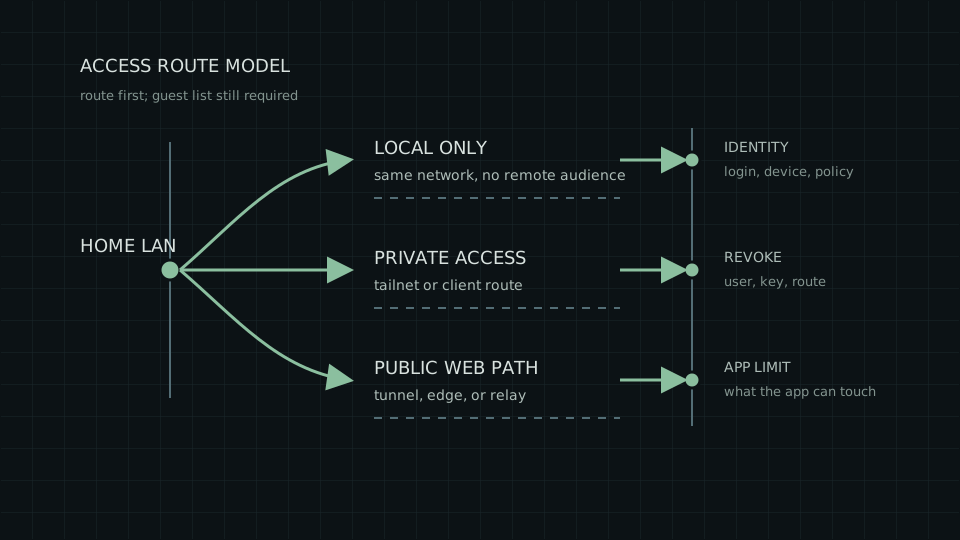
Start With The Audience
Start with the people and devices, not the product name.
If the service is only for you at home, keep it local. If it is for admin access when you are away, private access usually fits before public publishing. If ordinary browsers need to reach it, then you are building a public route and need to treat it that way. Remote access should start when the audience changes, not when a tutorial looks interesting.
Local-Only Is Usually The Right Default
Local-only means the service stays on your LAN: your home or office network. You reach it from the same network, and there is no remote route for strangers, friends, or future-you to discover at 1 a.m. If the service only matters while you are at home, this is often the best answer.
A local-only service can still be badly secured. It can have a weak password, an old container, a default account, or access to files it should not touch. But the reachability problem is smaller because the service is not being offered to people outside the local network.
Local-only fits:
- dashboards used from the same desk
- admin tools for machines you only maintain on site
- media or utility services that do not need outside users
- experiments that should not accidentally become permanent public services
The checklist is short: the firewall does not offer the service outside the LAN, the app stays updated, the app has a real login where the data matters, and nobody has added a tunnel because remote access felt inevitable.
Tailscale: Private Access Without A Public Front Door
Tailscale gives you private access without making the service a public website. Your devices join a private network, access rules say which device can reach which service, and the service stays off the public Internet. For a small homelab where you want to check a dashboard away from home without building a public front door, that is usually the right shape.
For private access, think of Tailscale as two things:
- a private network between approved devices
- rules for which approved devices can reach which services
Tailscale calls that private network a tailnet. Tailscale Serve lets a device share a local service inside the tailnet: still private, still limited to tailnet members.
Tailnet membership is not the whole policy. The tailnet policy file still needs to define which users or devices can reach which destinations and ports.
Tailscale Funnel is different. Funnel publishes a specific local service to the wider Internet; the audience is no longer just your tailnet.
Tailscale is less useful when the real audience is ordinary browser users who should not install an app or enrol a device. For that, use a public web route with explicit front-door rules.
Use the split:
- private service for your devices: tailnet access or Serve
- public or temporary sharing: Funnel or another public route
- admin page: private route first, public route only with a specific reason
Before you call private access done, name the allowed users or devices, the service and port they can reach, and the way you remove that access later.
Cloudflare Tunnel Is Publishing, Not Just Routing
Cloudflare Tunnel is useful when you want a browser-facing web app without a direct inbound router port to the origin service: the actual application running at home. Your server connects out to Cloudflare, then a public hostname such as app.example.com maps back to a local service such as http://192.0.2.20:8080.
That is worth something: no port-forward rule on the router, and no direct inbound path to the origin.
It is still publishing. If ordinary browsers can reach app.example.com, then the public has a route to something you run.
Cloudflare Access is the separate layer that puts login and policy rules in front of the public hostname. The tunnel carries traffic; Access decides who is allowed through.
For a public self-hosted web app, answer these before calling it done:
- whether the hostname should exist at all
- whether Cloudflare Access sits in front of the app
- who is allowed by the Access policy
- whether the app also has its own login
- what files, tokens, and other services the app can reach
- how you check logs and remove access later
Stopping at “no open port” leaves the rest of the model blank. A more complete answer looks like this:
The origin service has no direct inbound router port, the public hostname has an explicit access rule, the app has its own login where it needs one, and the app’s reach to files, tokens, and neighbouring services is deliberately limited.
Messier to describe, but closer to a plan.
Pangolin Makes You Operate The Platform
The Pangolin guide on this site uses one narrow pattern: a public edge host, one home-side Newt agent, one browser-facing app path, and one private admin resource. Newt is Pangolin’s connector software for linking a home-side site back to the public side.
That split is the point. Pangolin makes the public/private choice visible.
Pangolin organises services as resources. Public HTTPS resources are for browser-facing services. Private resources require a client and explicit access.
That lets you separate jobs:
- a public web resource for something that should be reachable by browser
- a private client-required resource for admin or non-public access
- a site connector behind the firewall rather than a direct home router port
The cost is operations. If you self-host the public side, you now operate an access platform and a public edge. That means updates, backups, DNS, certificates, logs, access rules, and recovery planning.
Pangolin gives you a different control point with its own work attached. Use it when the resource model is useful enough to justify the platform.
Direct Exposure Means Operating The Surface
Direct port forwarding is the plain baseline. Someone on the Internet reaches your public address, your router or firewall forwards a port, and the target service answers.
Some operators do this deliberately. Many beginners do it because it was the first tutorial that worked, and those two situations need different answers.
A VPS reverse proxy or relay moves the public front door away from the home router. That can be a good pattern, but it is not free. The VPS becomes part of the service: it needs patching, firewall rules, TLS certificates, monitoring, logs, and a recovery story.
A Small NixOS Public Edge Host, Begrudgingly in the Cloud covers the public-edge role as a narrow, rebuildable machine rather than a general cloud adventure. That is the right attitude: if there must be a public edge, make it boring, small, and explicit.
Making a service reachable is usually the easy part. The harder question: are you prepared to operate the public surface you just created?
Route Options Compared
| Route | Good fit | Main thing to watch |
|---|---|---|
| Local-only | Services only used at home or in a small office | Accidentally publishing it later |
| Tailscale tailnet / Serve | Private access for your devices or trusted users | Tailnet policy |
| Tailscale Funnel | Temporary or narrow public sharing | The audience changes to the Internet |
| Cloudflare Tunnel plus Access | Browser-facing web apps without a direct inbound router port to the origin service | Access policy and app permissions |
| Pangolin public resource | Browser-facing services through an access platform you operate | Platform maintenance and public-resource policy |
| Pangolin private resource | Admin or non-public access with explicit resource rules | Granting more network access than needed |
| Direct port forward | Narrow cases where you accept direct public exposure | Router rules and app hardening |
| VPS reverse proxy / relay | A public edge you operate yourself | The VPS becomes part of the service |
The Checklist Before Publishing Anything
Before giving a service any route from outside the LAN, write down the answers.
| Question | Why it matters |
|---|---|
| Who can reach the entry point? | LAN users, tailnet users, client users, and the Internet are different audiences. |
| Who can log in? | A route can carry traffic without deciding who should pass. |
| Does the app have its own login? | Front-door login and app login fail in different ways. |
| What else can the app reach? | A weak app can expose files, tokens, databases, or other services behind it. |
| How do you remove access? | You should know how to remove a user, device, key, client, token, or policy rule. |
| What logs exist? | If you cannot tell who used the route, design as if you will not know later. |
| What happens if the app is weak? | A tidy tunnel can still lead to a vulnerable app. |
| Who maintains the public edge? | A VPS, Pangolin server, Cloudflare account, or tunnel daemon is now part of the system. |
No open port is a useful property. The plan is knowing which door exists, who has the key, what is behind it, and how quickly you can close it when the answer changes.
The boring order is usually best: keep it local if remote access is not needed, use private access for admin paths, add public web publishing only when ordinary browsers really need it, and give every public path a revocation habit before it becomes permanent.
If this points you toward a small public edge, read A Small NixOS Public Edge Host, Begrudgingly in the Cloud. If it points you toward Pangolin, read Using Pangolin to Reach a CGNAT Homelab Without Moving House.
Sources Used
This article is a decision framework, not a lab report. It uses the current public documentation for Cloudflare Tunnel, Cloudflare public self-hosted applications, Cloudflare Access policies, Tailscale Serve, Tailscale Funnel, Tailscale policy syntax, Pangolin’s model, Pangolin resources, and Pangolin sites.