OpenZFS RAIDZ Expansion in a VM That Had Nothing to Lose
- Published
- 9 June 2026
- Updated
- 9 June 2026
A RAIDZ vdev running out of space used to mean either living with it or planning a rebuild. OpenZFS 2.3.0 changed that conversation: a device can be attached to an existing RAIDZ group, and OpenZFS rewrites the layout while the pool stays online. Worth rehearsing before it touches storage that matters.
The OpenZFS 2.3.0 release notes introduced RAIDZ expansion, and the zpool-attach(8) documentation gives the command path. This lab used Debian 13.5, OpenZFS 2.3.2-2, four 8 GiB virtual disks, and a pool named sdzlab. Expansion completed, both test payloads verified, and the final scrub returned 0 errors. Good enough for a lab note. Not enough to bless a production pool.
What The Lab Used
The environment was deliberately small:
| Field | Value |
|---|---|
| Host | Throwaway VM |
| OS | Debian GNU/Linux 13.5 / trixie |
| OpenZFS | zfs-2.3.2-2, zfs-kmod-2.3.2-2 |
| Initial layout | Three 8 GiB virtual disks in RAIDZ1 |
| Expansion disk | Fourth 8 GiB virtual disk |
| Pool | sdzlab |
| Dataset | sdzlab/data |
| Test data | Two 1 GiB test payload files |
The Debian Trixie package was new enough for this test. The package check reported zfsutils-linux 2.3.2-2, and zpool upgrade -v listed raidz_expansion. The pool feature was enabled after creation and active after expansion.
Before the pool was built, the VM had no existing pools, no importable pools, and no filesystem signatures on the four data disks. A clean target matters more than a tidy command transcript.
Create The Pool And Write A Baseline Payload
The initial pool used three of the four virtual disks. Compression stayed off so a 1 GiB write looked like a 1 GiB write.
zpool create -f -o ashift=12 sdzlab raidz1 /dev/sdb /dev/sdc /dev/sdd
zfs create sdzlab/data
zfs set compression=off sdzlab/data
After creation, zpool status showed a healthy three-disk RAIDZ1 vdev:
pool: sdzlab
state: ONLINE

NAME           STATE     READ WRITE CKSUM
sdzlab         ONLINE       0     0     0
  raidz1-0     ONLINE       0     0     0
    /dev/sdb1  ONLINE       0     0     0
    /dev/sdc1  ONLINE       0     0     0
    /dev/sdd1  ONLINE       0     0     0
Then the lab wrote a 1 GiB file before expansion:
dd if=/dev/urandom of=/sdzlab/data/pre-expansion-payload.bin bs=16M count=64 status=progress
sha256sum /sdzlab/data/pre-expansion-payload.bin > /sdzlab/data/pre-expansion-payload.sha256
The pre-expansion checksum was:
0239ba1585445ebe54bed5d02b186808322c831ce0505425ad1fb03b201b9423Attach The Fourth Disk
zpool attach -w sdzlab raidz1-0 /dev/sdeThe -w flag made the command wait for completion. During the run, zpool status showed live progress and the fourth disk already present in the vdev.
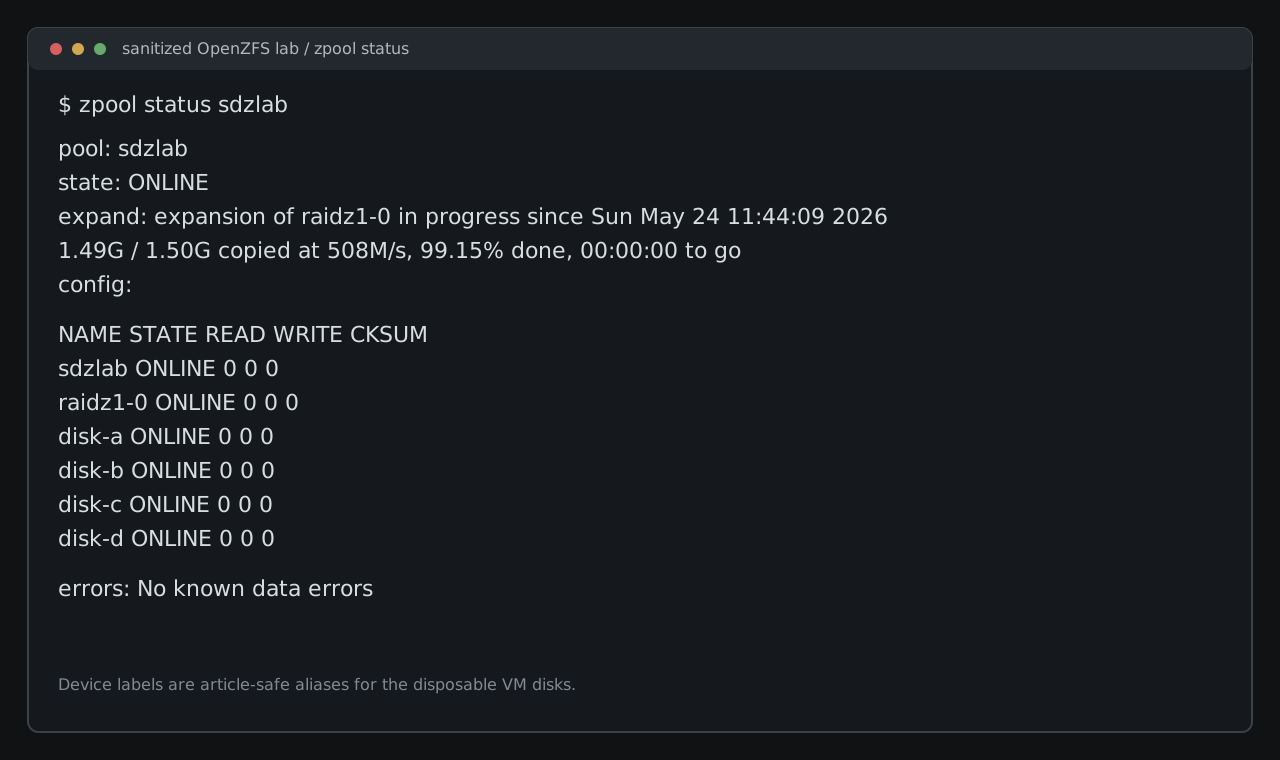
The captured progress points were 2.92%, 20.56%, 35.44%, 53.05%, 73.71%, 88.86%, and 99.15%. OpenZFS reported:
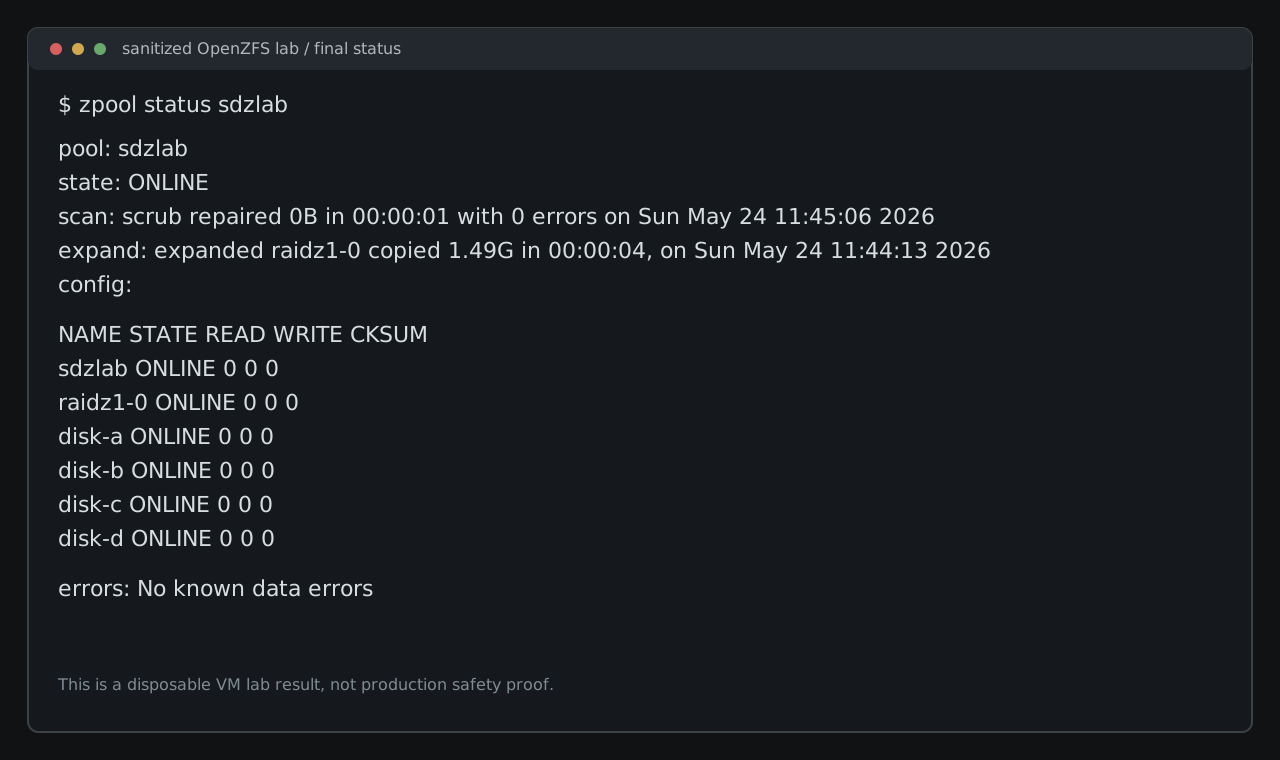
expanded raidz1-0 copied 1.49G in 00:00:04Four seconds is not a useful estimate. This VM had 1 GiB of old data on virtual disks. The point is that expansion completed, progress stayed visible, and the pool stayed online with no read, write, or checksum errors.
Verify The Payloads And Scrub
The original payload passed:
sha256sum -c /sdzlab/data/pre-expansion-payload.sha256/sdzlab/data/pre-expansion-payload.bin: OKOpenZFS started a scrub immediately after expansion. It completed with 0 errors in this small lab. A manual follow-up scrub after writing the second payload also completed cleanly.
The post-expansion payload was another 1 GiB test file:
dd if=/dev/urandom of=/sdzlab/data/post-expansion-payload.bin bs=16M count=64 status=progress
sha256sum /sdzlab/data/post-expansion-payload.bin > /sdzlab/data/post-expansion-payload.sha256
Its checksum was:
24ffcf3bd0b61756dacf274284f215d4626a3521c4b258c00cf01431ee299b86After the final scrub, both payloads verified:
/sdzlab/data/pre-expansion-payload.bin: OK
/sdzlab/data/post-expansion-payload.bin: OK
The final pool status was clean:
Space Reporting Lagged Behind The Topology
The vdev showed four disks before the headline capacity changed. Here are the recorded values converted from bytes:
| Stage | Topology | Pool size | Allocated | Free | Dataset used | Dataset available | Health |
|---|---|---|---|---|---|---|---|
| After create | 3-disk RAIDZ1 | 23.50 GiB | 1.30 MiB | 23.50 GiB | 128 KiB | 15.16 GiB | ONLINE |
| After pre-expansion write | 3-disk RAIDZ1 | 23.50 GiB | 1.50 GiB | 22.00 GiB | 1023.88 MiB | 14.16 GiB | ONLINE |
| After expansion | 4-disk RAIDZ1 | 23.50 GiB | 1.50 GiB | 22.00 GiB | 1023.90 MiB | 14.16 GiB | ONLINE |
| After post-expansion write | 4-disk RAIDZ1 | 31.50 GiB | 3.30 GiB | 28.20 GiB | 1.92 GiB | 18.41 GiB | ONLINE |
| After final scrub | 4-disk RAIDZ1 | 31.50 GiB | 2.88 GiB | 28.62 GiB | 1.92 GiB | 18.41 GiB | ONLINE |
In the “After expansion” row, the vdev had four disks, the expansion feature was active, and the pool was healthy. zpool list still reported the old pool size immediately after attach. After the post-expansion write, the reported pool size increased.
The OpenZFS feature documentation describes RAIDZ expansion as attaching a device to a RAIDZ group. In this run, zpool status, zpool list, and zfs list were not telling the same story at the same instant. If you are watching a real expansion, record all three.
What The Lab Actually Proves
One throwaway Debian 13.5 VM running OpenZFS 2.3.2-2 could:
- create a three-disk RAIDZ1 pool
- write and checksum pre-expansion data
- attach a fourth disk with
zpool attach -w - show live expansion progress in
zpool status - verify the original payload after expansion
- write and verify a post-expansion payload
- complete a final scrub with 0 errors
The test stops there. It did not cover a failed disk, a power cut, controller weirdness, performance, TrueNAS, or the basic requirement for a backup you have actually restored from.
Pre-Flight Checklist Before A Real Pool
For storage that matters, the checklist should be dull and specific:
- Confirm the exact OpenZFS version on the system that owns the pool.
- Read the matching release notes and
zpool attachdocumentation for that version. - Confirm the pool is healthy, then run a current scrub and fix any errors first.
- Record
zpool status,zpool list,zfs list, pool features, and disk identifiers before changing the layout. - Prove that the backup restores the data you care about.
- Identify the expansion disk by a stable name, not by hope and a changing
/dev/sdXletter. - Check import compatibility if the pool may ever need to move to another host.
- Practice the command on a disposable lab shaped like the real pool.
- Keep time aside to watch
zpool status, checksum old data, write new data, and run a scrub after expansion. - Treat capacity reporting as something to measure during the run, not as a promise from a diagram.
RAIDZ expansion changes a capacity-planning problem. It does not change the storage rule underneath it: if the data matters, one pool is not the whole plan. The first rehearsal belongs on junk disks.